
Learning how to take photos for real estate comes down to a repeatable process: prep, light, shoot to a list, edit honestly and upload. Buyers meet a listing online before they ever book a showing. In NAR’s 2025 Profile of Home Buyers and Sellers, 81% of recent buyers who used the internet rated photos “very useful,” the top-rated website feature.
This guide is for new and soon-to-be agents shooting their first listings or hiring a photographer for the first time. You can follow most of it with a smartphone and a tripod. It covers ground-level interior and exterior real estate photos, and it points you to a separate guide for aerial shots.
Table of Contents
- Why Listing Photos Matter Before Buyers Ever Call
- How to Take Photos for Real Estate With the Gear You Have
- How to Prep a Property for the Shoot
- How to Light Interior and Exterior Shots
- How to Compose Real Estate Photos That Look Professional
- A Room-by-Room Shot List for Your First Listing
- How to Edit Real Estate Photos Without Misrepresenting the Home
- Should You Take Your Own Photos or Hire a Photographer?
- Uploading Photos to the MLS
- Frequently Asked Questions
- Conclusion
Key Takeaways
- Prep beats gear: A clean, well-lit room shot on a phone and tripod looks better than a cluttered room shot on a pricey camera.
- Shoot to a shot list: A room-by-room list keeps you from missing the photos buyers expect. It also keeps you from wasting the seller’s time.
- Light and lines look professional: Time your natural light, shoot from corners at chest height and keep vertical lines straight.
- Adjust the photo, don’t change the property: Brightness fixes are routine. Adding or removing features can mislead buyers and, in California, requires a disclosure.
- Know who owns the photos: If you hire a photographer, get written terms that cover MLS and marketing use before the shoot.
Why Listing Photos Matter Before Buyers Ever Call
Many buyers start their search on a screen. In the same NAR buyer and seller profile, 46% of buyers said their first step was looking online for properties for sale. Your listing photos often make the introduction before you do.
The report also asked buyers who used the internet which website features they found very useful. Photos (81%) came out ahead of detailed property information (77%), floor plans (57%), virtual tours (38%) and videos (29%).

Buyers rank photos above even the written property details, so give photo quality the first block of your listing prep time.
Agents see the same pattern. In NAR’s 2025 Profile of Home Staging, 88% of sellers’ agents and 73% of buyers’ agents rated photos more or much more important to clients. Those numbers reflect what agents say about their clients, so treat them as a read on expectations.
For you as a new agent, listing photos are often the first piece of your marketing a seller judges. A seller who sees their home looking dark or cramped online will start to question the rest of your plan. Good photos give you credibility at the moment you have the least track record.
Be realistic about what photos can do. These reports measure what buyers and agents say, not whether photos change how fast a home sells or what it sells for. Strong photos earn the click and the showing request, and the home, the price and the market still have to do the rest.
How to Take Photos for Real Estate With the Gear You Have
Gear matters less than technique. Start with the phone or camera you already own. Then add three inexpensive tools that solve the most common problems: shaky shots, tilted lines and flat, dull color.
Smartphone or Camera: What Works for Your First Listings
A recent smartphone with an ultra-wide lens handles most standard homes. Phones also blend exposures automatically, which saves you editing time. The trade-off is less control in very dark rooms, large open spaces and rooms with walls of bright windows.
A camera with a wide-angle lens gives you that control through manual exposure, bracketing and files that hold up better in editing. It also costs more, takes longer to learn and adds editing time to every listing. For your first few listings, learn on your phone and decide later whether a camera earns its cost.
Before you shoot, set up your phone camera:
- Turn on gridlines in your camera settings so you can line up walls and door frames.
- Tap to lock focus and exposure on a mid-tone area of the room, away from windows.
- Shoot in landscape orientation so each frame shows more of the room.
- Skip portrait mode, which blurs the backgrounds buyers want to see.
- Avoid digital zoom, and step closer or switch lenses instead.
The Three Add-Ons Worth Buying
- Tripod: Keeps every shot steady, level and at the same height, which matters most in low light.
- Wide-angle option: Use your phone’s built-in ultra-wide lens or a wide-angle lens made for your camera.
- Editing app: Lets you fix brightness, color and crooked lines in a few minutes per photo.
Add a portable light only if you keep running into dark rooms. Skip fisheye lenses and clip-on fisheye attachments. They bend straight walls into curves, which distorts the room and can mislead buyers about the space.
How to Prep a Property for the Shoot
Prep does more for your listing photos than any piece of gear. Walk through the home with the seller one or two days before the shoot and hand them a written checklist:
- Clear kitchen and bathroom counters down to one or two items.
- Hide cords, chargers and trash cans.
- Take down personal photos and anything with family names on it.
- Move cars out of the driveway.
- Put toilet lids down and hang fresh towels.
- Turn off TVs and ceiling fans.
- Replace burned-out bulbs so every light works.
- Clean windows, mirrors and glass doors.
Stage for function. Each room should show buyers its purpose: a bed in the bedroom, a table in the dining area, a clear desk in the office. If the seller is weighing professional staging, walk them through how much it costs to stage a house so they can decide with real numbers.
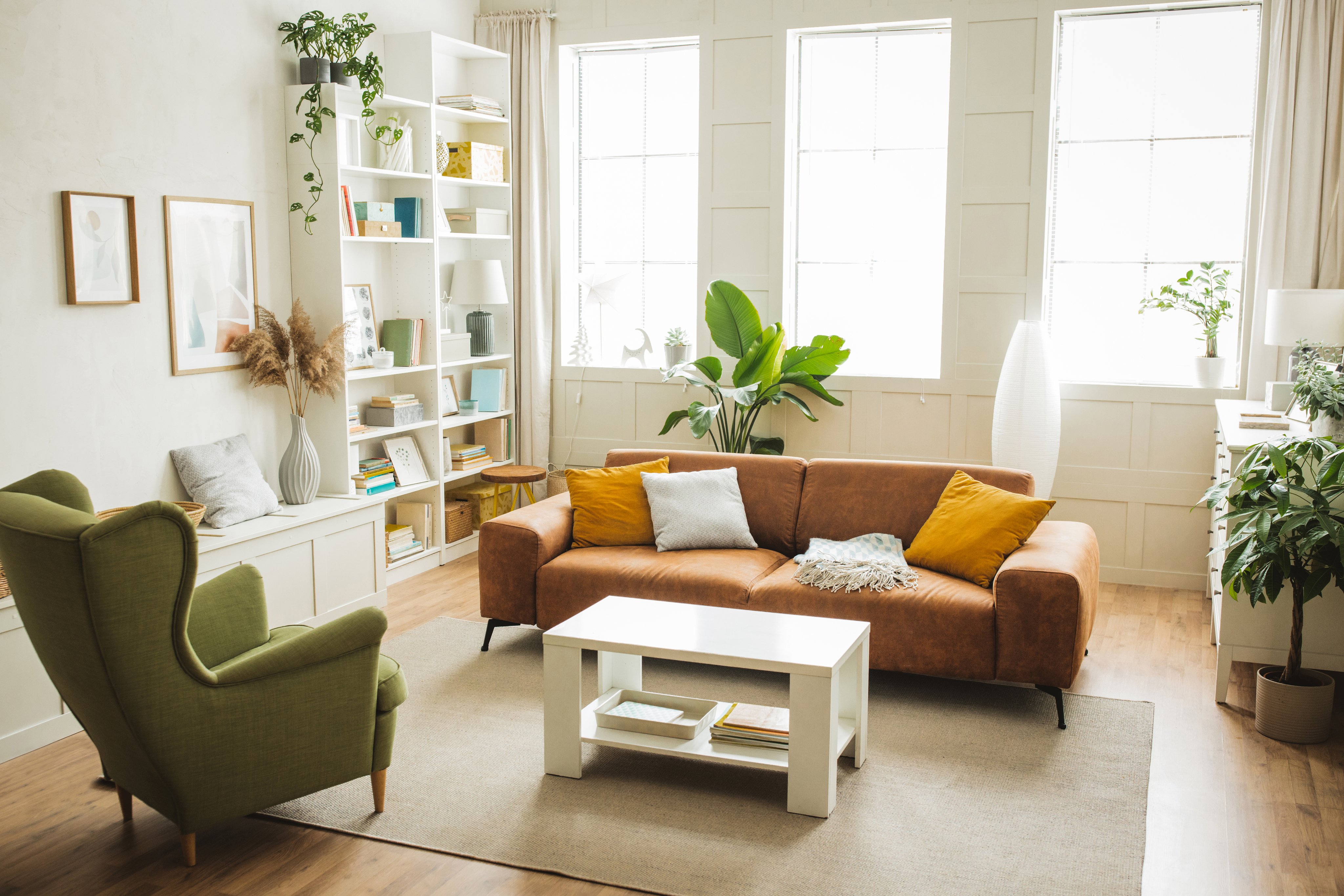
Treat the checklist as a seller conversation. Going over it in person shows the seller how you work and gives them a clear job before shoot day. It also saves time once you arrive, because you’re photographing instead of moving furniture.
Be candid about what you can and can’t fix. If a room has a dated carpet or a stained ceiling, prep won’t hide it, and editing shouldn’t. Set that expectation now so the seller isn’t surprised when the photos show the home as it is.
How to Light Interior and Exterior Shots
Light is the biggest difference between amateur and professional real estate photos. You can’t control the weather, but you can control when you shoot and what you do with the light in each room.
Timing Your Natural Light
For interiors, shoot when rooms get bright, even daylight. That’s often late morning to early afternoon, but it depends on which way the key rooms face. Note the direction of the main living spaces during your walk-through and schedule around them.
For exteriors, shoot with the sun behind you so the front of the home is lit and the sky stays blue. If the front faces into the sun at your shoot time, a bright overcast day gives soft, even light without harsh shadows. A dusk or twilight front shot can work as a cover image when the home has strong exterior lighting.
Inside, open every blind and curtain and turn on every light, including lamps and under-cabinet lights. Keeping all lights on makes the color more consistent across rooms. Skip direct on-camera flash, which flattens the room and throws hard shadows on the walls.
Handling Bright Windows and Mixed Light
Bright windows are the classic problem. Your eye sees both the room and the view, but a camera usually exposes for one and loses the other. HDR (high dynamic range) solves this by blending several exposures so windows and shadows both show detail.
Most phones apply HDR automatically, so check that it’s on in your camera settings. On a camera, use bracketing: take three or five exposures of the same frame on a tripod and blend them in editing. Keep the result natural, since heavy HDR makes rooms look gray and artificial.
White balance is the other fix. Mixed light from warm bulbs and cool daylight can tint walls yellow or blue. Adjust white balance in your editing app until white walls and ceilings look white, then apply the same setting to every photo of that room.
How to Compose Real Estate Photos That Look Professional
Composition is where real estate photography tips turn into habits. Three rules cover most rooms: shoot from a corner, keep the camera at chest height and keep vertical lines straight.
Corners, Height and Straight Lines
Stand in a corner or doorway and aim across the room so you capture two or three walls. That angle shows the size of the room and how it connects to the next space. Shooting a flat wall head-on usually makes a room look smaller and boxier.
Set the camera at about chest height, roughly four to five feet off the floor. Higher angles show too much floor, and lower angles show too much ceiling. Keep the camera level so vertical lines stay vertical, because tilting up or down makes walls and door frames lean.
Take two or three angles of every main room, then pick the best one or two later. It adds a few minutes on site and can save you a return trip.
Wide Without Misleading
Use wide angles to show the space, without making it look bigger than it is. If you can’t fit the room in, step back into the doorway before you switch to a wider setting. A buyer who walks in and finds a smaller room than the photos promised loses trust in the listing and in you.
Watch for these common mistakes before you press the shutter:
- Crooked horizons and leaning walls
- Your reflection in mirrors, windows or appliances
- Blinds left half-open
- Too much ceiling in the frame
- Close-ups of small details with no context
A Room-by-Room Shot List for Your First Listing
Use this list on every shoot so you don’t miss the photos buyers expect. Each line pairs the shot with an angle or prep cue. Copy it into your phone’s notes and check items off as you go.
- Exterior: Front straight-on and at an angle, backyard, outdoor living space and the street view if it’s a selling point.
- Entry and living spaces: Entry looking in, living room from two corners and the dining area showing how it connects.
- Kitchen: Wide from the entry, an angle along the island or counters and one detail shot only for a real upgrade.
- Bedrooms: Primary bedroom from the corner farthest from the door, plus one shot of each secondary bedroom.
- Bathrooms: Primary bathroom wide and one shot of each other bathroom, with toilet lids down and no reflection in the mirror.
- Bonus spaces and features: Office, laundry, basement, garage, fireplace and any view worth showing.
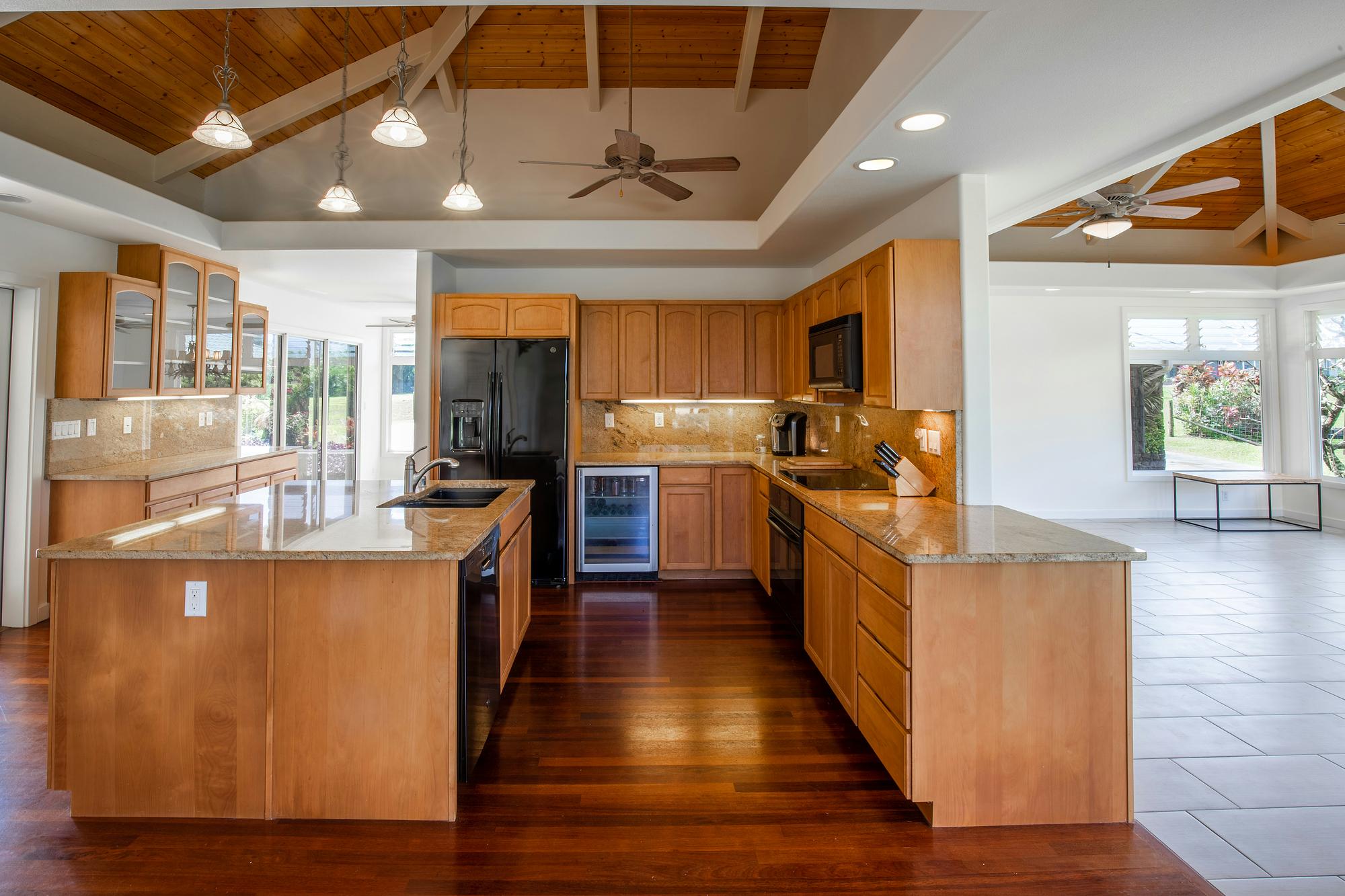
Even under a vaulted ceiling, the cabinet edges and window frames stay upright because the camera was held level instead of tilted up.
Upload photos in walk-through order, starting with the strongest exterior shot, so buyers move through the home the way they would at a showing. Check your MLS’s rules on the primary photo before you choose it. For example, MLS Now’s photo rules require the primary photo to be the front exterior view of the property.
Aerial shots are outside this list. For acreage, a view or a standout lot, see our real estate drone photography guide for when aerials help and how to get them.
How to Edit Real Estate Photos Without Misrepresenting the Home
Editing should make a photo accurate. Your goal is an image that looks like the room does when a buyer walks in on a bright day.
Adjust the Photo, Don’t Change the Property
One test keeps you on solid ground: adjust how the photo looks, but leave what the property is alone. These are routine edits that adjust the photo:
- Brightness and exposure
- White balance and color correction
- Straightening vertical lines
- Cropping
These are risky edits that change the property:
- Removing cracks, stains or water damage
- Erasing power lines or neighboring buildings
- Replacing the view through a window
- Changing flooring, paint colors or fixtures
Article 12 of the NAR Code of Ethics says REALTORS® “shall present a true picture in their advertising.” Standard of Practice 12-10 bars “misleading images.” That ethics duty applies to REALTOR® members and is separate from state law.
California’s AB 723 adds a legal disclosure duty for brokers, salespeople and anyone acting for them. It applies when they use a digitally altered image in an ad selling real property.
They must add a reasonably conspicuous statement on or next to the image saying it’s been altered. They must also include a link, URL or QR code to the original, unaltered image.
Under the law, “digitally altered” means using photo software or AI to add, remove or change elements. Examples include furniture, flooring, paint color, landscaping and views through windows. Lighting, sharpening, white balance, color correction, angle, straightening, cropping and exposure edits are excluded if they “do not change the representation of the real property.”
According to a March 17, 2026 advisory from the California Department of Real Estate, licensees must comply as of January 1, 2026.
Some MLSs also require labels on edited or staged photos. MLS Now, for example, requires an on-image label such as “Virtually Staged” or “Digitally Altered” on every altered, staged or rendered image. Check your MLS rules and ask your broker before you publish. This section is general guidance, not legal advice.
Virtual Staging for Vacant Rooms
Virtual staging adds digital furniture to photos of empty rooms. It helps buyers picture how a vacant space works without anyone moving furniture in. It’s also a digital alteration, so the honesty test applies in full:
- Label every virtually staged photo as virtually staged.
- Keep the original, unaltered photos and make them easy to find.
- Leave permanent features alone, including walls, floors, windows, fixtures and views.
In California, AB 723’s disclosure statement and original-image link apply here too, since adding furniture is one of the listed alterations. If you’re comparing tools, our guide to virtual staging software covers the options and what to look for.
Should You Take Your Own Photos or Hire a Photographer?
This decision comes down to the property, your budget and your skill level today. Many new agents do both: they shoot simple listings themselves and hire out the harder ones.
When DIY Makes Sense and When to Hire
Shooting your own photos makes sense for standard homes, quick turnarounds, tight budgets and rentals while you’re building skills. Hire a professional for luxury listings, large or complex homes, dark interiors, twilight or aerial shots, or when the seller expects it.
Hiring is common practice. In the NAR home staging profile, 76% of sellers’ agents said they recommend professional photos to sellers. Treat that as a signal of seller expectations, since the report doesn’t compare how DIY and professional photos perform.
Photographer pricing varies by market, so get two or three quotes before your first listing appointment. Then build a clear photo plan into your listing presentation. Showing sellers exactly how you’ll market their home is one way to win more listings.
When you hire, brief the photographer in writing:
- Your shot list, including must-capture features
- The prep date and shoot date
- Delivery format and image size for your MLS
- Turnaround time
- Usage rights for MLS, portal, social and print use
Who Owns the Listing Photos?
Few new agents ask this until there’s a problem. According to the U.S. Copyright Office, the initial copyright owner of a photograph “is generally the person who ‘shoots’ or ‘takes’ the photo.” So by default, paying for a shoot doesn’t make you the owner.
That matters when you upload. MLS Now, for example, says participants “must own or have written permission to use images and documents.” Each MLS sets its own rules, so check yours.
Our practical advice: get a written agreement before the shoot that covers MLS, portal, social and print use, plus what happens after the listing ends. Ask your broker for the brokerage’s standard photographer agreement. If a question comes up, talk to your broker or an attorney, since this guide isn’t legal advice.
Uploading Photos to the MLS
Every MLS sets its own photo rules, and they vary from one market to the next. Before your first upload, look up your MLS’s requirements and ask your broker about brokerage policy. Check these items:
- Maximum photo count per listing
- File size and minimum resolution
- Orientation requirements
- Branding rules on signs, watermarks and agent photos
- Labeling rules for edited or virtually staged photos
Lead with your best exterior shot, then order the rest as a walk-through. Add short captions where your MLS allows them, such as “Primary bedroom with walk-in closet.” Captions help buyers place each room in the layout.
Photos and copy work as a pair. Once your images are in order, learn how to write a listing description that sells so the text points buyers to what the photos show.
Frequently Asked Questions
What Is the Best Time of Day to Take Real Estate Photos?
Shoot interiors in bright, even daylight, often late morning to early afternoon, depending on which way the rooms face. Shoot exteriors with the sun behind the camera or on a bright overcast day. A twilight front shot can make a standout cover image.
Can You Take Real Estate Photos With a Phone?
Yes, for most standard homes. Use a tripod, the ultra-wide lens, gridlines and HDR for rooms with bright windows. A camera with a wide-angle lens gives you more control in dark or very large spaces.
How Many Photos Should a Listing Have?
Take enough to cover every main room and key feature once or twice. Your MLS sets the maximum, so check its rules. Skip near-duplicates, which push buyers past the shots that matter.
Do You Have to Disclose Edited Listing Photos?
It depends on your state and MLS. In California, AB 723 has required a disclosure statement and a link to the original for digitally altered listing images since January 1, 2026. Routine brightness and color fixes don’t count when they don’t change how the property is represented.
What Are the Most Common Real Estate Photo Mistakes?
The most common mistakes are clutter, dark rooms, leaning verticals, reflections in mirrors, fisheye distortion and over-editing. A prep checklist, a tripod and a level camera prevent many of them.
Conclusion
You now know how to take photos for real estate with a full workflow. Prep the home, time the light, compose from corners, shoot to the list, edit honestly and upload. Each step is a skill you can practice before a seller is counting on you.
Your next move is to copy the shot list and photograph a friend’s home or your own before your first listing appointment. Review the results against the mistakes list, reshoot anything that fails, and bring your best set to listing presentations as samples.
If you aren’t licensed yet, you’ll need a license before you can list and market someone else’s home. When you’re ready to get your real estate license, Colibri’s pre-licensing courses give you a guided, state-approved path with built-in exam prep. They’re backed by our Pass or Don’t Pay guarantee.
To build the rest of your toolkit for your first listings, start with the free starter kit:
Master Real Estate FREE Starter Kit Here
Related Content
- Real Estate Drone Photography Guide: Benefits, Tips & Getting Started
- How Much Does It Cost to Stage a House? A Complete Guide for Real Estate Professionals
- Virtual Real Estate Staging: Choosing the Best Virtual Staging Software
- How to Write a Real Estate Listing Description That Converts Into Sales
- 10 Tips to Win a Real Estate Listing


